Know what's vulnerable on your servers, and what to fix first.
A small, read-only agent on each server lists what's installed. Every hour, Cyberscan checks that list against the public vulnerability databases and tells you, in order, what has a fix, what's waiting on the vendor, and what you can safely ignore.
How to fix: one step per package manager or project. Read it, then run it.
Install the agentOne command per server, shown in your dashboard. It sends a first report straight away, so you know it works.
We check every hourYour server's list is matched against fresh advisories each hour. A problem published this morning shows up this morning.
You fix what mattersFindings grouped by package, with the command to run. An email the moment a vendor releases a fix.
What it checks
Everything that runs on the server, not just the operating system. The agent reports what's installed; all the matching happens on our side, so new advisories reach you without touching your servers.
Operating system packages
Every installed package on Debian, Ubuntu, Alpine, Rocky Linux and AlmaLinux, matched by the version your distribution actually ships.
Debian's own security tracker read, so issues Debian calls unimportant drop out
Kernel advisories counted once, not once per kernel package
Checked against NVD when you built or installed them yourself
Left to your distribution's advisories when it ships them, so no false alarms from back-ported fixes
Your applications' libraries
The lockfiles of the apps you deploy, wherever they live on the server.
npm
Composer
Pub
PyPI
RubyGems
Optional
Container images
The packages inside each running Docker image, checked against that image's own distribution, plus a warning for images over six months old.
OSV
NVD
Debian security tracker
CISA Known Exploited Vulnerabilities
Findings you can act on
A stock server can show over a thousand advisories. Most aren't yours to fix. Cyberscan sorts them so the short list on top is the one that matters.
Three groups, by package
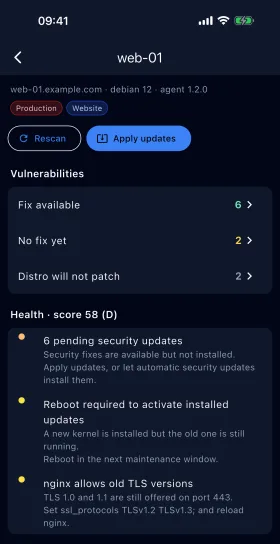
Fix available: a newer version fixes it
No fix yet: watch it, the vendor hasn't shipped one
Distro will not patch: judged minor by your distribution
One line per package, with its worst severity and the version you need
How to fix, per project
For each server, the commands to run: apt-get, npm audit fix, composer update, dart pub upgrade, docker pull. Suggestions to read before you run them, never run for you.
Alerts that don't shout
Email, Slack or Discord
Serious, fixable or actively exploited issues only
One message for the whole fleet, not one per server
An email the moment a vendor releases a fix
A quiet summary for a new server's first scan
Triage with a record
Acknowledge a finding, or accept the risk with a written reason. Every decision is logged. Findings close themselves when the vulnerable version leaves the server.
Coming soon to the App Store and Google Play
Deal with alerts on the move
Cyber Scan, the phone app, links to your account when you scan a code shown in Settings. When an alert reaches your inbox, Slack or Discord, open the app to see what's affected and act on it from wherever you are.
Every server, worst first, with exploited, critical and high counts
Findings by package, with the version that fixes them
Acknowledge a finding, or accept the risk with a reason
Ask for a rescan, or apply updates where the server allows it
Server health at a glance
No ads and no tracking. The camera is only used to read the link code.
Cyber Scan on iPhone, with demo data
Server health
The things that quietly go wrong on a server nobody's looked at for a while.
Updates and reboots
Updates waiting, with security and held-back updates marked
Running an older kernel than the one installed
Processes still running code that's been replaced
Package lists that haven't been refreshed
Certificates and sites
TLS certificates close to expiry, or expired
Old protocols (TLS 1.0 and 1.1) still allowed, or no TLS 1.3
After an OS upgrade
Package sources still pointing at the old release
Packages no repository provides any more
Leftover keys and config from removed packages
Support status
Whether your OS release still gets security support
When it's moved to long-term support, or reached end of life
Containers running on images over six months old
A record of every change
Update log and weekly report
What was upgraded, installed or removed on each server, OS upgrades, and which findings each change closed. A weekly report, on screen or by email on Mondays, with what's fixed, what's new and what's still open.
Built for teams
Separate workspaces, with team roles
Two-factor sign-in
Mark template and old-copy folders as not deployed, with a reason, so they stop raising alerts
Optional
Active Defense
Decoy services on your servers that look like easy targets, and alert you the moment someone tries to get in.
Safe by design
The agent is read-only and sandboxed, and never runs anything it's sent
It never opens .env, config or source files
Applying updates from the dashboard, inside a maintenance window, only if you switch it on at the server
Agent updates only install releases we've signed, and only if you allow them
Questions
Do I need Aison to use Cyberscan?
No. Cyberscan is its own product with its own account at security.aison.tech. It works on any Linux server you run, whether or not you use the Aison platform.
Will the agent change anything on my server?
Not unless you allow it. The agent only reads and reports. Applying updates and updating the agent are both off until the server's own admin switches them on when installing, and the dashboard can't switch them on remotely. Updates only ever upgrade packages; nothing is removed.
Which systems does it work on?
Debian, Ubuntu, Alpine, Rocky Linux and AlmaLinux are checked. Applying updates from the dashboard works on Debian and Ubuntu. The agent needs Python 3 and curl, and runs as a system service.
Does it read my code or secrets?
No. It reads package lists and lockfiles only. It skips .env, config and source files, dependency folders and version control, and never follows links out of the folders you choose.
Is there a phone app?
Yes. Cyber Scan for iPhone and Android is coming soon to the App Store and Google Play. Link it to your account by scanning a code in Settings, then check findings, acknowledge them, rescan or apply updates from your phone. Alerts still come by email, Slack or Discord.
What does it cost?
There are plans for a few servers up to large fleets. Create an account to see them, or tell us how many servers you have and we'll suggest one.
See what's on your servers today
Install the agent on one server and get its first report in about a minute.